
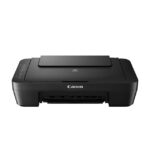

Description
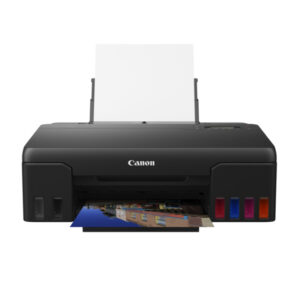
Canon PIXMA TS3370s All in One WiFi Inkjet Colour Printer
Compact Wireless All-In-One with LCD for Low-Cost Printing
This printer is designed to give you an affordable wireless printing experience at low running cost.
- Print, Scan, Copy
- ISO standard print speed (A4): 7.7 images per minute black / 4.0 images per minute colour
- Hi-speed USB 2.0, Wireless, Wireless Pictbridge, Mopria, AirPrint, Wireless Direct
- Recommended print volume: 50 – 200 pages
| Print Head / Ink | |
| Type | Permanent |
| Number of Nozzles | Total 1 280 nozzles |
| Ink Catridges | PG-745s, CL-746s |
| Printing Resolution | 4 800 (horizontal)*1 x 1 200 (vertical) dpi |
| Print Speed*2
Based on ISO/IEC 24734 |
|
| Document (ESAT/Simplex) | 7.7 images per minute (black)/4.0 images per minute (colour) |
| Photo (10.16 x 15.24cm) (PP-201/Borderless) | 65s |
| Printable Width | 203.2mm |
| Printable Area | |
| Borderless Printing*3 | Top/Bottom/Right/Left margin: each 0 mm (Supported paper size: 10.16 x 15.24cm, 12.7 x 17.78cm, Square (12.7 x 12.7cm) |
| Bordered Printing | Top margin: 3mm, Bottom margin: 5mm, Left/Right margin: 3.4 mm (l: Left: 6.4 mm, Right: 6.3mm) |
| Support Media | |
| Rear Tray | Plain Paper Photo Paper Plus Glossy II (PP-201) Glossy Photo Paper “Everyday Use” (GP-508) Photo Paper Plus Glossy II (PP-208) |
| Paper Size | |
| Rear Tray | A4, A5, B5, l, LGL, 10.16 x 15.24cm,12.7 x 17.78cm, Square (12.7 x 12.7cm) [Custom size]: width 101.6mm – 215.9 mm, length 127mm – 676mm |
| Paper Size (Borderless)*4 | 10.16 x 15.24cm, 12.7 x 17.78cm, Square (12.7 x 12.7cm) |
| Paper Handling (Number) | |
| Rear Tray (Plain Paper) | A4 = 60 |
| Paper Weight | |
| Rear Tray | Plain Paper: 64-105 g/m², Canon specialty paper: maximum paper weight: 275g/m² (Photo Paper Plus Glossy II, PP-201) |
| Ink End Sensor | Dot count |
| Print Head Alignment | Manual |
Scan*5
| Scanner Type | Flatbed |
| Scanner Method | CIS (Contact Image Sensor) |
| Optical Resolution*6 | 600 x 1 200dpi |
| Scanning Bit Depth (Input/Output) | |
| Grayscale | 16bit/8bit |
| Colour | RGB each 16bit/8bit |
| Line Scanning Speed*7 | |
| Grayscale | 1.5 ms/line (300dpi) |
| Colour | 3.5 ms/line (300dpi) |
| Document Size | |
| Flatbed | A4/l (216 x 297mm) |
Copy
| Document Size | A4/l |
| Compatible Media | |
| Size | A4/A5/B5/LTR/10.16 x 15.24cm/12.7 x 17.78cm/Square 12.7 x 12.7cm) |
| Type | Plain Paper Glossy Photo Paper “Everyday Use” (GP-508) Photo Paper Plus Glossy II (PP-201) Photo Paper Plus Glossy II (PP-208) |
| Image Quality | 2 positions (Draft, Standard) |
| Copy Speed*8
Based on ISO/IEC 24734 |
|
| Document (sFCOT/Simplex) | 3.0 images per minute |
| Document (sESAT/Simplex) | 2.7s |
| Multiple Copy | |
| Black/Colour: | 1 – 20 pages |
Network
| Protocol | SNMP, HTTP, TCP/IP (IPv4/IPv6) |
| Wired LAN | |
| Network Type | IEEE802.11n/IEEE802.11g/IEEE802.11b |
| Frequency Band | 2.4GHz |
| Channel*8 | 1-13 |
| Security | WEP64/128bit WPA-PSK (TKIP/AES) WPA2-PSK (TKIP/AES) |
| Direct Connection (Wireless LAN) | Available (Acess Point Mode only) |
Printing Solutions
| AirPrint | Available |
| Windows 10 Mobile | Available |
| Mopria | Available |
| Canon Print Service (for Android) |
Available |
| PIXMA Cloud Link (from smartphone/tablet) |
Available |
| Canon PRINT | Available |
System Requirements*9
| Windows 10 / 8.1 / 7 SP1 (operation can only be guaranteed on a PC with a pre-installed Windows 7 or later.) Mac OS v10.12 ~ v 10.14, Mac OS X 10.11.6 |
General Specifications
| Operation Panel | |
| Display | LCD (3.8cm segment mono) |
| Interface | Hi-Speed USB 2.0 |
| PictBridge (Wireless) | Available |
| Operating Environment*10 | |
| Temperature | 5 – 35°C |
| Humidity | 10 – 90% RH (no dew condensation) |
| Recommended Environment*11 | |
| Temperature | 15 – 30°C |
| Humidity | 10 – 80% RH (no dew condensation) |
| Storage Environment | |
| Temperature | 0 – 40°C |
| Humidity | 5 – 95% RH (no dew condensation) |
| Quiet Mode | Available |
| Acoustic Noise (PC Print) | |
| Plain Paper (A4, B/W)*12 | 53.5 dB |
| Power | AC 100-240V, 50/60Hz |
| Power Consumption | |
| OFF | 0.3W |
| Standby (scanning lamp is off) USB connection to PC |
1.7W |
| Standby (all ports connected, scanning lamp is off) | 1.7W |
| Time to enter Standby mode | 10min 38s |
| Copying*13 USB connection to PC |
11W |
| Environment | |
| Regulation | RoHS (EU, China), WEEE (EU) |
| Dimension (WxDxH) | |
| Factory Configuration | 435 x 316 x 145mm |
| Output/ADF trays extended | 435 x 553 x 212mm |
| Weight | 3.9kg |
Page Yield
| Plain Paper (A4 pages) (ISO/IEC 24712 test file)*14 |
PG-745s: 100 pages CL-746s: 100 pagesPG-745: 180 pagesCL-746: 180 pages |
- Ink droplets can be placed with a pitch of 0.000529167cm
- Document print speeds are the averages of ESAT (Word, Excel, PDF) in Office Category Test for the default simplex mode, ISO/IEC 24734.
Photo print speed is based on the default setting using ISO/JIS-SCID N2 on Photo Paper Plus Glossy II and does not take into account data processing time on host computer.
Print speed may vary depending on system configuration, interface, software, document complexity, print mode, page coverage, type of paper used etc. - Paper Type NOT supported for borderless printing are as follows: Envelope, High Resolution Paper, T-Shirt Transfer, Photo Stickers.
- Paper types NOT supported for borderless printing are as follows: Envelope, High Resolution Paper, T-Shirt Transter.
- TWAIN driver (ScanGear) is based on the TWAIN specification V1.9 and requires the Data Source Manager comes with the operating system.
- Optical resolution scan is available, only when you use TWAIN Driver.
Optical resolution is a measure of maximum hardware sampling resolution, based on ISO 14473 standard. - The fastest speed in Hi-Speed USB on Windows PC. Transfer time to computer is not included.
- 1-11 in US, CND, LTN, BRA, TW and HK.
- Please visit https://asia.canon to check OS compatibility and to download the latest driver updates.
- The performance of the printer may be reduced under certain temperature and humidity conditions.
- For the temperature and humidity condition of papers such as photo paper, refer to the paper’s packaging or the supplied instructions.
- Acoustic Noise is measured based on ISO7779 standard with default setting.
- Copy: When copying ISO/JIS-SCID N2 (printed by inkjet printer) on A4 size plain paper using default settings.
- Declared yield value in accordance with ISO/IEC 24711 (for A4 size) using ISO/IEC 24712 test file, and ISO/IEC 29102 (for 10.16 x 15.24cm size) using ISO/IEX 29103 test file. Values obtained by continuous printing.
- Estimated supplemental yield.
Disclaimer |
|
Reviews
There are no reviews yet.